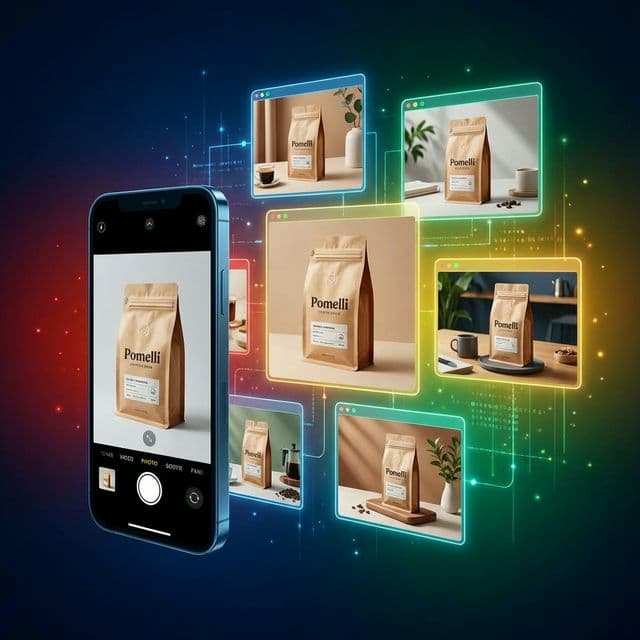
Photoshoot in Pomelli: Google's Free AI Photo Studio Explained
Google's Pomelli Photoshoot turns a single rough product photo into studio-quality images in minutes — for free. Learn how it works, the template styles available, and where it fits in your marketing stack.
If you sell anything online, you already know the pain: your products deserve studio-quality photos, but your budget and schedule say "maybe next quarter." Google's new Photoshoot feature in Pomelli changes that equation by turning a single rough product shot into a full set of polished, on-brand images in minutes — and it's free.
What Is Pomelli (And Why Photoshoot Matters)?
Pomelli is an experimental AI marketing tool from Google Labs and Google DeepMind that takes your website URL and turns it into ready-to-edit campaigns. It scans your site, learns your brand's tone, colors, fonts, and visual style, and stores that as your "Business DNA."
Photoshoot is a new module inside Pomelli that focuses specifically on product photography. Instead of hiring a photographer, you upload one basic product photo and let the AI generate studio-grade shots, lifestyle scenes, and ad-ready creatives that match your existing brand.
For small and medium-sized businesses that don't have an in-house creative team, this dramatically lowers the barrier to professional-looking marketing content.
How Photoshoot in Pomelli Works
At a high level, Photoshoot follows a simple flow: understand your brand → take in a product photo → generate and refine images.
graph LR
    A[Paste URL] --> B[Build Business DNA]
    B --> C[Upload Product Photo]
    C --> D[Choose Template]
    D --> E[Generate Images]
    E --> F[Refine & Edit]
    F --> G[Export & Reuse]
1. Paste Your URL and Build "Business DNA"
You start at labs.google.com/pomelli and sign in with your Google account, then paste your website URL. Pomelli crawls your public pages to learn your logo, brand colors, fonts, imagery style, and tone of voice — Google calls this combined profile your Business DNA.
That Business DNA becomes the anchor for everything Pomelli generates, from layouts and image treatments to headlines and captions.
2. Upload a Product Photo (No Studio Needed)
To use Photoshoot, you click "Create a product photoshoot" and upload a photo of your product — or even just paste a product page URL in some flows. The image doesn't need to be polished; Google explicitly says:
"Start with any picture, and don't worry about polish — we'll take care of it."
This single image (or linked product) is the raw material the AI will use to generate all of your new visuals.
3. Choose a Template Style
Next, you pick from professionally designed templates that define the overall look of your shoot. Current options include:
| Template | What It Does |
|---|---|
| Studio | Clean backgrounds, controlled lighting, classic e-commerce look. |
| Floating | Product isolated and "floating" with shadows for a modern, minimal feel. |
| Ingredient | Flat-lays and detail shots that highlight ingredients or components. |
| In-use | AI-generated models or scenes where the product appears in action. |
| Lifestyle | Realistic environments showing how the product fits into everyday life. |
You can also let Pomelli suggest templates based on your brand and product category.
4. Generate Studio-Quality Images
Once you've picked a product and a template, you hit Generate. Under the hood, Pomelli uses Google's Nano Banana image model (part of the Gemini family) plus your Business DNA to transform that single base photo into multiple professional images.
It does more than slap on a new background:
- Adjusts lighting, perspective, and composition.
- Places your product into new scenes and layouts.
- Applies your brand colors and visual style so everything stays on-brand.
From one rough shot, you can walk away with what looks like a complete campaign photoshoot.
5. Refine, Edit, and Iterate
After generation, you land in an editor where you can tweak what the AI produced:
- Change backgrounds with natural language prompts (for example, "change my background to a forest").
- Restyle images using a reference image (for example, "make this product shot match this moodboard").
- Adjust layouts, crop for different formats, and edit text overlays for ads or social posts.
If a template or angle doesn't work, you simply regenerate a new batch of variations.
6. Export and Reuse Across Channels
When you're happy with the images, you can download them in common aspect ratios like 1:1, 9:16, and 16:9 for feeds, Stories, Reels, and web banners. You can also save images back into your Business DNA library so Pomelli can reuse that look in future campaigns.
This closes the loop: your brand DNA informs the shoot, and the shoot's best assets feed back into the brand system.
Real-World Example: A Coffee Brand Photoshoot in Minutes
To make this concrete, imagine you run a small coffee roastery with a simple Shopify site.
- You paste your URL into Pomelli, which learns your earthy color palette, minimalist typography, and warm photography style.
- You snap a quick phone photo of your coffee bag on a desk and upload it into Photoshoot.
- You select "Ingredient" and "Lifestyle" templates.
- Nano Banana generates several sets of images: your bag styled on a rustic wooden table, an overhead flat-lay with beans and mugs, and a cozy café scene where the bag appears next to a steaming cup — all graded to match your brand.
- You tweak a couple of backgrounds, crop vertical versions for Instagram Reels covers, and download the full set.
What would usually require a photographer, studio, and editing time now happens in under ten minutes inside a browser, at zero additional cost.
Where Photoshoot Fits in Your Marketing Stack
Photoshoot is currently free and available in the United States, Canada, Australia, and New Zealand, with the overall Pomelli beta focused on English-speaking markets for now. For many teams, it won't completely replace high-end custom shoots, but it's a strong fit for:
- Small brands that need good-enough visuals fast for product launches, promos, and social.
- Marketers testing multiple ad variants who need lots of creative options without lots of spend.
- Agencies and freelancers who want a quick starting point they can polish further in traditional design tools.
As AI-generated visuals become more capable and more common, tools like Pomelli Photoshoot will likely become a default part of the content pipeline — especially for teams that don't have a dedicated studio.
Video Tutorial
Watch this walkthrough to see Photoshoot in Pomelli in action:
Key Takeaways
- One photo in, many photos out. Photoshoot turns a single unpolished product image into a full set of studio-quality creatives.
- Brand-aware generation. Your Business DNA ensures every generated image matches your existing visual identity.
- Natural language editing. Refine backgrounds, styles, and layouts by describing what you want in plain English.
- Free to use. No subscription or per-image fees — just a Google account and a supported region.
- Built for iteration. Export in multiple aspect ratios, save favorites back to your brand library, and regenerate until you're satisfied.
Whether you're launching a new product line or refreshing stale catalog images, Pomelli Photoshoot removes the biggest friction points — cost, time, and expertise — from professional product photography.
Originally published by HelloTrust on HelloTrust.com